Every teacher has been there: it's 10 minutes before class and you need a quick answer: who still hasn't turned in that essay? In Brightspace, that answer requires more clicks than it should. This guide covers how to do it with the built-in tools, and a faster method that gets you the same list in about two seconds.
The built-in Brightspace method
Brightspace does let you see unsubmitted students, but the option is buried inside each individual assignment. Here's how to find it:
That's five steps, and you have to repeat them for every single assignment you want to check.
The limitations of this approach
The built-in method works, but it has some real friction points that add up over the course of a week:
- One assignment at a time. There's no dashboard that shows you all missing submissions across your whole class at once. If you want to check three assignments, you're repeating those five steps three times.
- Quizzes are separate. The Quizzes tool has its own, slightly different process. Missing quiz submissions aren't combined anywhere with missing assignment submissions.
- No history. Brightspace doesn't keep a log of who was missing work at a specific point in time. If you need that for a parent conversation or a report, you're on your own.
- Copy-pasting required. If you want the list in an email, a spreadsheet, or anywhere else, you're copying names manually.
The D2L community forums are full of teachers asking for a better way to see missing submissions across multiple assignments. As of 2026, Brightspace still doesn't have a native cross-assignment missing work dashboard.
A faster way: ClassWatcher
ClassWatcher is a free Chrome extension built specifically for D2L Brightspace teachers. Instead of clicking through menus, you open an assignment or quiz page and ClassWatcher automatically scans the class and shows you every missing student in a panel on the right side of your screen, with no extra steps.
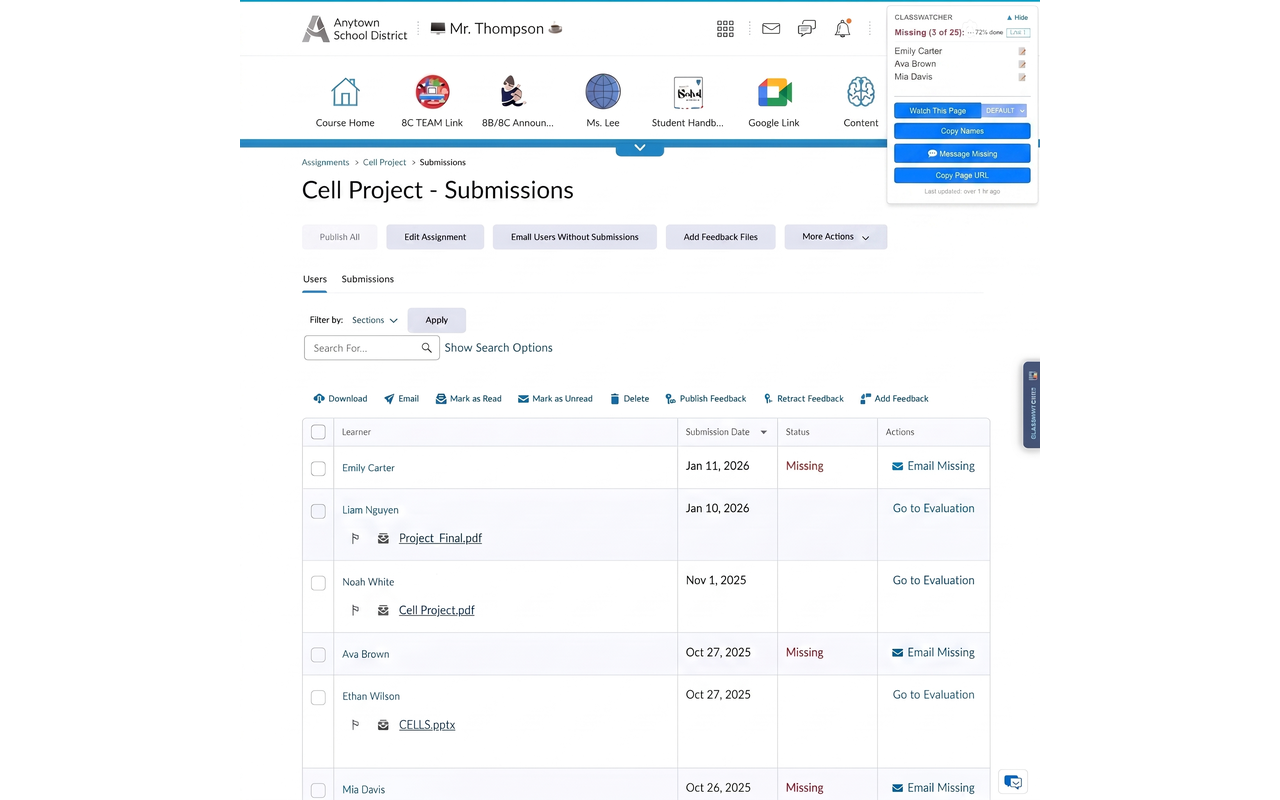
What's different compared to the built-in method:
- Instant. The scan happens automatically when you open the page. No filter to apply, no search to run.
- Works for assignments and quizzes. Same experience on both. Open the page, see who's missing.
- Copy the list in one click. A single button copies all missing names in a formatted list you can paste anywhere.
- Watch list. Bookmark specific assignments to your personal watch list so you can check them regularly without navigating back through the course.
- Message the right people directly. Elementary teachers can text or email parents. High school teachers can reach students and parents. College instructors can message students. All from the same panel, with no switching apps.
What used to take 10 minutes takes 10 seconds. Open the page, see the list, send the message.
ClassWatcher is free to start with no credit card required. It works with any D2L Brightspace school and installs in about 30 seconds from the Chrome Web Store.